Saturday, 31 May 2014

Hidden Features of Wechat | Best Wechat Tips and Tricks

Smartphones have many features in common with mobile phones because of the rather common now-a- days most of people use mobiles smartphones . Current Android , Windows , iPhone is the most used smartphone operating system . For free from the app store you can download lots of applications . Communication applications grows very well these days and every day millions of people create new accounts on these applications . So many members each mobile operating system available for many communications applications , but some of them are . Those WhatsApp, Wechat, line and have Viber .

Here I communicate with my friends, which reduces your work Wechat list of some of the hidden features.
Also see how to increase your adsense revenue

Hidden Features of Wechat

Send Text Update from Wechat Moments:

Using Wechat moments you can take pictures and share with your friends. Instead of sharing images wechat moments you can send text updates to your friends. Follow the steps below.
Also see how to increase your blog traffic

1. Select moments option from the discover tab and you will see your album cover in the next screen.

2. Now click on camera icon on the top of the screen and hold it for a while to see text update screen.


3.Now you compose and send text message button to share with your friends.


Shake Mobile to Search New Friends:

Shake to find new friends in wechat application is the best and unique feature. Using this feature you locally or globally can connect with new friends. To facilitate this, follow the steps below.

1.Search tab and select an option from the Shake Shake your mobile once again it automatically searches for friends locally and globally.


2.After shaking mobile you’ll see at least one new friend from other location. Here you can see few new friends in my application.


Drift Bottle:

It's like a game, this feature voice message or text message with the subject you need to throw a bottle into the sea because it is a fun feature drift bottle.

Wechat firstly you need to enable the feature from settings drift bottle. General settings and the option to go for.


Now enable drift bottle from the features option, click on throw bottle to send a voice or text message to someone in the world.


It provides two different options one is voice and another one text. You can choose any one of them. Here I choose text version and type some text in that before throwing the bottle in ocean. If you don’t want these feature simply disable it on features.


By the way you can also pick other people bottle from that ocean using pick option. You definitely like this feature because it’s so funny.

People Nearby:

Using this feature you can find friends who are close to your location. On its location near the facility, which uses your mobile GPS connection and discovery. Here is what locale you set your wechat account.


To enable this feature just go to settings menu and choose General settings and enable “People nearby” option.

Tuesday, 27 May 2014

How to Protect USB/Pendrive with Password

Here in this article we passwords with a USB / pen drive and how to protect various types of software such protection we can give you the know -how . Now a days every one is the same size flash drives use flash at all , but because transferring data from one computer to another computer GB drive capacity to carry data . We boot into Windows computers, USB flash drives and DVD players use to play the songs . We also like office files and other confidential information via flash drive to carry important data . Anyone try to steal your pen drive can imagine , the price is not a problem , but the data is more important .

So to prevent your important data from others is not easy to break, need to set some security. USB flash drive with password protecting Here we are good at, which provide some third-party applications.

USB Security:

USB Security USB Flash Drive is a great software to protect your data . Without the password is not easy to get the data from the USB drive , which provide better security to your pen drive . It is a shareware application , but for 30 days it works well with all the functions . After you use the application without any problem need to buy the full license

How to Use USB Security on USB Drive?

1.First you visit the website below to download the latest version of the USB security needs


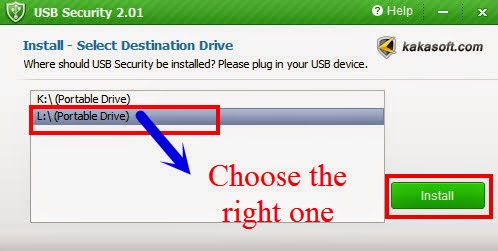
2. The open USB security application and click the accept button to start the installation. After you click the button to accept the removal of all available drives in your PC will show it.

3.Choose your USB drive from the list and click on install button, after that click on finish button to complete the installation.
4.Now you have the option of some sort of protection pen drive which will see another window. This pen drive you to set a new password and then type the password in the next field asks for one. You forgot the password, type the password to remember some hints.


5.Make sure to check whether the password to uppercase or lowercase. Once the defense to protect data in the pen drive, click on the button to complete the setup.

6.This copies the data into a secret partition and password lock. To get data from USB flash drive pen drive pendrive USBsecurity.exe file and must enter a password to unlock

Monday, 26 May 2014

Best Browser for Android Smartphone/ Tablet

Day by day , there are several browsers available on the internet . In recent times , due to the development of foreign products , Indian products are being outranked by them . In addition , users often now a days because apps , mobile sites , and link shorteners redirects between two or three get stuck bouncing . In fact the solution at the final destination of your search result links to lots of seconds is wasted waiting for .

Link Bubble:Google stores the play of Chris equip a recent browser application running in the background with a terrible rolling loading is changed by a single link. It's on every Android phone these days, which is becoming viral. For us it's the best browser of your Android smartphone into detail about the features seem

How to Install Link Bubble Application :

Installing links to other established App bubble is the same as other Apps . Goto Google Play Store and link to search for bubbles is all you need . You can find Lite version and the Pro version . Select the application to install and use . Link Pro and Lite version is more efficient than many advantages . Bubble Pro is available for Rs.249.99 as the link where the link is open for bubble lights . ( $ 4.99 ) . Otherwise it 's all over now pro grab the offer because of the overwhelming response will be expensive at a time .

How Link Bubble Works :

You tried to open a link from your Facebook account once , it adds a few seconds , the Google URL shortner or via bitly or any URL Shortner, through the bounces. You can get to the page , but that again can redirect to a mobile version . All this happens while the reasons to stare at the loading screen ? Link with bubbles , the page starts loading in the background while you scroll through the contents until ready to continue . You will be getting on the side of a pop icon and all that junk is when it just pops up in a separate browser panel . Like a Facebook chat you head to the edge of the screen , at least you can leave the page and bubble float . This is convenient when you want to open it up and left that can be dragged to any location 

Check out the YouTube video link bubble by Chris Lacy:


You can check the details of time saved in the below screenshots:

Sunday, 25 May 2014

Advantages and Disadvantages of Social Network.

Advantages


►It Helps You Stay Connected With Your Relatives,Friends,Close Ones Who Had to Left You to Far Places.You can see What They are Doing,Their Activities,How are They,What is Their new Place Like. So You Don't Feel That Much Effected With The Separation.


►It Helps You Find Your Old Friends Who Lost Contact With You Somehow.It's Great to Find,See,Talk and meet them again.Memories are Refreshed and Old Times Come Back.

►It Helps You approach people with more ease and to open up easily.There are Times when you are not able to approach someone either cause you are afraid of the result and sometimes you don't have the time or it is out of your limits to approach someone,In that case social network helps you a lot and sometimes it works very well.

►It also Helps You Stay Connected with the World and the Happenings Around You.Most Of us Don't Watch News Channel but Social Media is an Interesting as well as entertaining Source of Latest News and Updates.You Get To Know who is hot nowadays,what is going around your country.

►It Helps You Grow Your Personal or Company Business or Interest to a Very Good amount of Audience.This is a great benefit of it.You earn Money, You Get Fans, You get Ideas and Suggestions and a Lots of Appreciation. 

►It Helps You Talk to Other Countries and States People and Learn Their Cultures and Their Ways. It Provides a Very Excellent way To Interact With Those Peoples and Grow Your Experience of Human Nature Worldwide.


Disadvantages

►It Ruins Your Actual Social Life.So many People around you are Not That Much Friendly and Talkative Like when They are On Facebook.You Love Talking to Strangers Denying the Fact That You Have not Seen Them in person.You are Extra Sweet and Polite and Totally Different From Your actual Nature And So are They.It's a Fake Friendship,Fake Conversation,Fake World.It's Just Like Drugs, They Give you Pleasure But They Take away Your Life.


►You start to Give More importance to Your Social Media Friends Then Your Actual Friends which is a Big Wrong Thing.You Don't Realize That Online Friends are like Robots. They Wont Help You When You are in Help in the REAL WORLD.They don't Think of You all the Time.They Don't consider You That Much Important but You do.THINK !

►Love is a big Failure When it is Through Social Media.I mean C'mon You Don't Know Them,You Haven't Seen Them,You Don't Know If The Next Person is Real/Fake.They just keep Saying and You just Keep believing, Are You That Dumb ? . Go Get a Real Lover in Your Real Life and See That It's millions Times Better and Strong than that on Social Networks.I could have 5 girlfriends on Facebook and 4 on Google plus but It's Hard to have more than one in real life . Got The Point ? One can easily cheat you on social networks but not in the real life. When You talk to The Person in real You Know If he/she is Real or Fake Towards you. Think!


►Addiction : You sit on Your Computer staring staring and staring on posts day and night.What are You Doing with your Life Dude ?
How You Going to Raise a Family When You Don't Have Money?How you Gonna Get Money If you Don't Work Hard for it?How you gonna work hard if you sit on your computer and stare stare and stare.How You gonna enjoy your future ? Don't Just Sit There Like an ass Stand up and so Some Other Productive Work.Don't Just Insult You Parents For Giving Birth to an ass Like You.


►You are not productive anymore.You don't play with cards,You don't play outside,You don't create new ideas and Plans.Social Network has eaten your brain up and it's limited to likes,comments and requests only.Are you Going to Request Request Request Whole Your Life.Come out of This bubble and be a Complete Human not a Half human and Half social media slave.

So You see it seems to be little difficult but believe me i deleted my account and i didn't sleep for 1 week but then i realize i was loosing nothing those who were really close to me are still with me .I can call them i can meet them up.I watch movies and news and entertain myself.I am Not Saying Delete Your Account I am Saying Shrink The Time you Give to These Social Life Eaters and Give Time To Yourself.I am Proud That I am Not a Social Media Victim. I am Not an Insult to MY Parent,My Life and My God. Think Over it!

Why Eminem is Greatest of All Time

For me and millions of other people,when it comes to music or rap it's Eminem.There are a lot of other artists but why Eminem is Eminem the Greatest of All Time. Let's Find Out.

#1 Lyrics

''My poetry's deep, and I'm still matic the way I flow to this beat''

Saturday, 24 May 2014

Clean your RAM without any software


Ram decide the speed of your computer.there are many software available in internet to keep your RAM free.but how much of these software supports to keep your RAM free?
And now I am going to show you something very easy to keep your RAM free.Its all few line of code which can be used with notepad.

You can do this simple tricks by following the steps below:

Open Notepad

TYPE FreeMem=Space(64000000)


Save it as "CLEANER.VBS" in any location you like.


you can edit the code 64000000 into 512 if you own a 512 MB RAM or change into any size of RAM of your PC(Convert your RAM value to bytes)

And now run it

Friday, 23 May 2014

Micromax Unite2 Launched

Micromax Unite 2 Has 21 Languages,has Moto E Features at same Price

Micromax,India 2nd largest smartphone maker on Thursday announced the world first phone with 21 language support the Micromax Unite 2
                                
                                The box of Micromax unite 2Powered by a 1.3Ghz quad core processor , you will be surprised to know that micromax unite 2 is the company first smartphone running on the latest android kitkat 4.4.2,which can be easily updated through
FOTA,offering user a number of features including voice search,Google drive,Hangout for video calls,smart
contact prioritisation etc.promising fast multitasking.

The phone will be available in 4 bright colors-Grey,White,Red and Green to break the monotony from the boring black and blue color